Chord grid
The chord grid (the Chord layout) makes every pad a full chord in your key, played with one press.
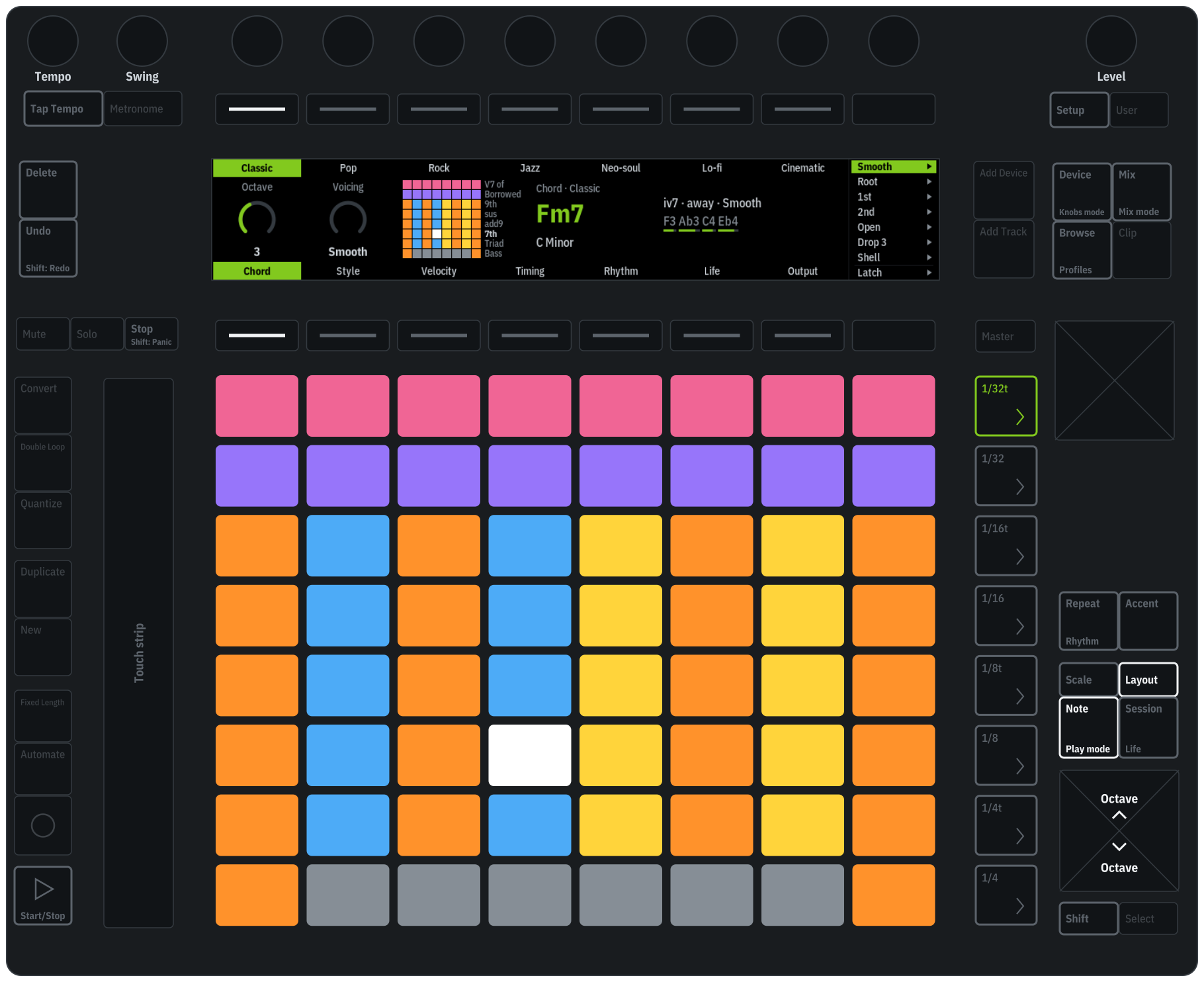 Fm7 held (white). Rows of chord kinds, colored by what each chord does; the side buttons pick the voicing.
- How it plays
- The pads
- The screen
- Voicings
- Latch
- Style: Press or Strum
- Velocity
- Timing
- Chord sets
- Scales
How it plays
Chords play together like hands on a piano:
- Brushing a neighbouring pad never cuts the chord you’re holding.
- Notes two chords share keep ringing instead of restriking, so changing chords legato keeps the common tones.
- Each chord’s root also plays on channel 3, for a bass synth. Chords play on channel 2. The Output page changes the channels and mutes chords or bass.
The pads
Columns are the steps of the key, so a progression is a hand shape: I–V–vi–IV is the same four pads in any key. The right-hand column is the first column’s chord an octave higher, and the screen says “octave up” when you play it.
Rows, bottom to top, in the default Classic set:
| Row | Chords |
|---|---|
| 1 | Bass notes |
| 2 | Triads (the home row) |
| 3 | 7ths |
| 4 | add9 |
| 5 | sus |
| 6 | 9ths |
| 7 | Borrowed chords from the parallel major or minor (violet) |
| 8 | Secondary dominants, which pull toward the chord in their column (pink) |
Colors show what each chord does: home chords in orange, chords that move away in blue, tension in yellow.
Hold a bass-row pad under a chord and the name shows the bass after a slash, such as G/B.
 A bass-row pad held under a chord: Fm/Ab.
The screen
- Each chord’s name, its Roman numeral and what it does (“V7 · tension”).
- A small map of the pads in the same colors, with each row’s name beside it. With nothing playing it also shows a color legend; while you play, it lights the row you pressed.
- The Chord page’s title names the chord set in use.
 Nothing playing: the pad map, the color legend and the voicings beside the side buttons.
Voicings
The side buttons pick the voicing. The right-hand edge of the screen, next to them, names each button from top to bottom: the voicing you kept is filled in the Play accent, one you’re holding is white, and Latch turns yellow when it’s on. The buttons light up the same way.
- Smooth (top, the default) moves as little as possible from one chord to the next so progressions glide; the same pad may voice differently depending on what you played before.
- Root, 1st, 2nd, 3rd force an inversion, so a pad always plays the same notes.
- Open and Wide spread the chord out.
- Drop 3 and Shell (root, 3rd and 7th, the jazz-piano left hand).
Tap a side button to keep its voicing, or hold it to use it only while held. If you press a side button from Knobs or Mix, a short message says what it did.
 Holding Open: the voicing you hold shows white in the column beside the side buttons.
There are nine voicings and seven side buttons. The buttons are shortcuts (Smooth, Root, 1st, 2nd, Open, Drop 3, Shell by default; a profile’s play: {chord: {voicing_buttons: [...]}} picks others). The Voicing encoder on the Chord page reaches all nine, 3rd inversion and Wide included.
Brightness on the Style page moves Smooth’s register up (brighter) or down (darker).
Latch
The bottom side button is Latch: chords keep sounding after you let go, so one hand can tap chords while the other strums. While Latch is holding a chord, the screen says “Latched · tap it again to stop”.
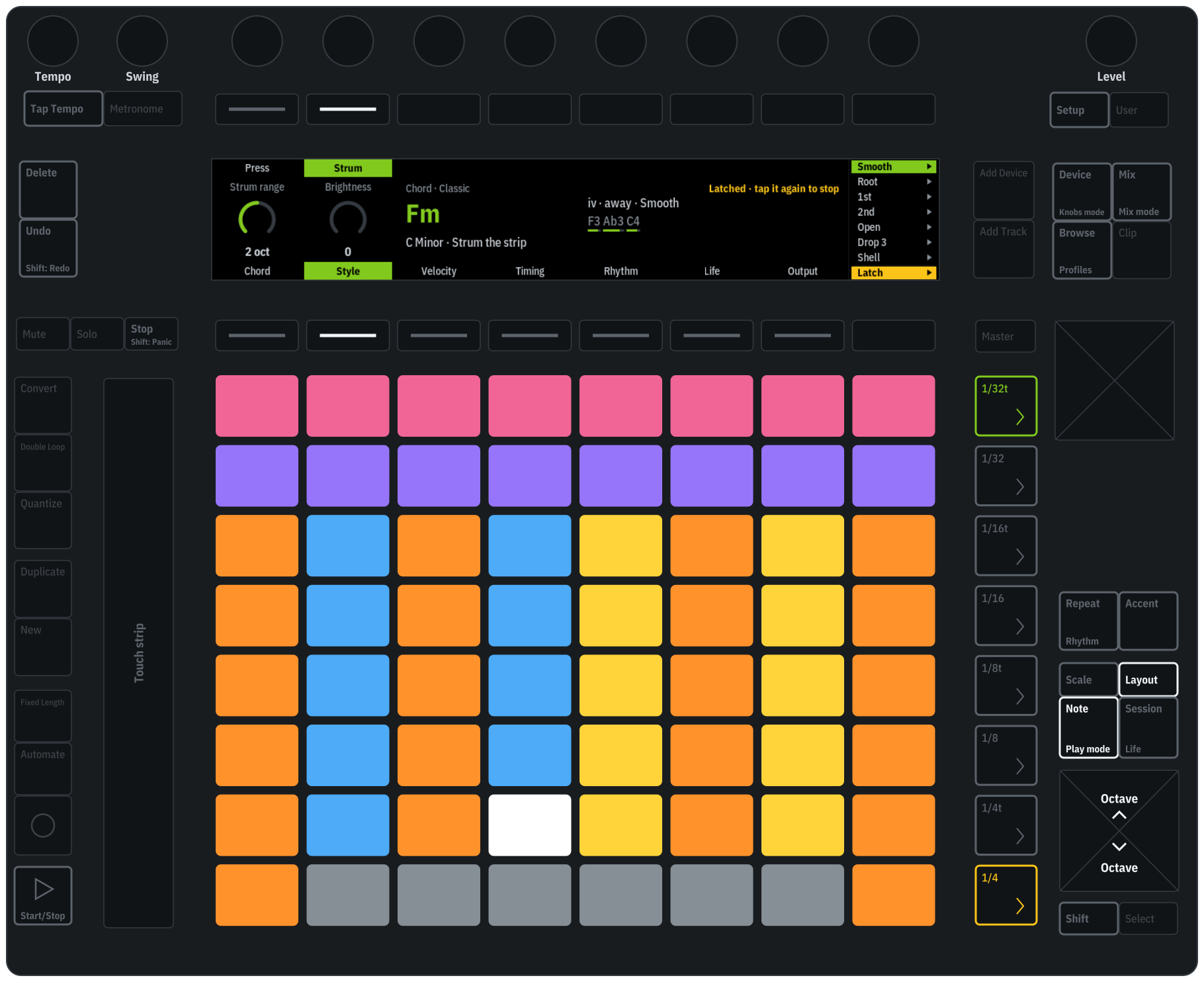 Latch on (yellow, bottom side button) and Strum on the Style page: the touch strip strums the latched chord.
Melody over a latched chord
Latch a chord, then switch to Keyboard: the chord keeps playing, its notes glow teal on the keyboard pads, and the screen says “over Fm7”. Play a melody on the glowing notes, switch back to change chords, or tap the chord again (or turn Latch off) to stop it.
 Keyboard over a latched chord: the screen says what’s playing underneath.
Style: Press or Strum
On the Style page:
- Press plays the chord on pad press.
- Strum turns the touch strip into a strum plate: hold a chord and slide across the strip.
Velocity
The Chord layout’s Velocity page sets how loud each note of a chord plays.
- Min and Max: the range your pads play in. Hitting harder still plays louder, scaled into that range.
- Random: every note of every chord gets its own velocity within Spread of where your hit landed, so chords sound played by hand instead of stamped.
- Top note: lifts (or lowers) the highest note so a melody can sing over the rest.
- The bass note stays steady.
- Accent means as loud as your range allows: chords center on Max, and with Random they vary downward from it, loud but alive.
Each strummed note, repeat and arp step rolls fresh velocities, and the screen draws each note’s velocity as a bar under its name.
 Random velocity: each note’s velocity as a bar under its name.
Timing
The Timing page sets when each note of a chord starts.
- Together plays them at once.
- Spread out rolls them in one after another:
- Roll: the time between notes (like a strum or a harp).
- Direction: Up, Down, Alternate (flipping every chord, like strumming up and down) or Random.
- Loose: a little random lateness on each note, like hands that aren’t quite together.
Notes only ever come later, never early, and the bass stays on time. Let go before a roll finishes and the rest of it doesn’t play. Repeats and the arpeggiator roll the same way.
 The Timing page, spread out.
Chord sets
A scale decides which notes you have; a chord set decides which flavors fill the grid’s rows. There are fourteen, by style:
- Classic: triads, 7ths, add9, sus, 9ths, borrowed, V7 of
- Pop, Anthem
- Rock: power chords first
- Blues: a dominant 7th on every step
- Jazz: 7ths, 6/9, 9ths, 11ths, 13ths, ii of, tritone subs
- Bossa
- Gospel: with the diminished chords that lead into each step
- Neo-soul, Lo-fi, Cinematic
- Ambient: sus2, add9, quartal, Lydian color
- Dark: Phrygian, diminished and augmented chords
- Modal: quartal chords and chords borrowed from Dorian, Mixolydian and Phrygian
To pick one:
- The scale menu’s third encoder scrolls them all.
- The Chord page’s seven buttons above the display hold your favorites: Classic, Pop, Rock, Jazz, Neo-soul, Lo-fi and Cinematic, unless a profile’s
favorite_sets: [...]picks others.
The pad map names each row, colors still show what each chord does, and a chord you’re holding changes with the set.
 The Jazz set, played with the Shell voicing.
Your own sets
Add them to a profile, seven row kinds each, bottom to top:
play:
  chord:
    channel: 2
    sets:
      Dreamy: [add9, sixth, ninth, quartal, borrowed_dorian, borrowed, secondary]
    favorite_sets: [Dreamy, Classic, Jazz, Gospel, Lo-fi, Ambient, Dark]
Row kinds: triad, seventh, add9, sus, sus2, sus4, ninth, sixth, six_nine, eleventh, thirteenth, add11, power, quartal, borrowed, borrowed_dorian, borrowed_mixolydian, borrowed_phrygian, borrowed_lydian, dominant (a dominant 7th on every step), augmented, secondary (V7 of), secondary_ii (ii of), secondary_dim (vii°7 of) and tritone_sub.
Where a tone would rub, a row uses the one players reach for instead: the iii in a 6th row is a iii7, and an 11th over a major chord is the pop 11 (9sus4).
Scales
Besides the major and minor modes, harmonic and melodic minor, pentatonics, blues and whole tone, there are Harmonic Major, Phrygian Dominant, Lydian Dominant, Altered, Hungarian Minor, Double Harmonic, Major Blues, Egyptian, Hirajoshi, In-Sen, Iwato, Pelog, Bebop Dominant and Major, and the two diminished scales.
Scales with fewer or more than seven notes take the chord grid’s chords from the seven-note scale they belong to (or the nearest one), and the screen says which.