Controls

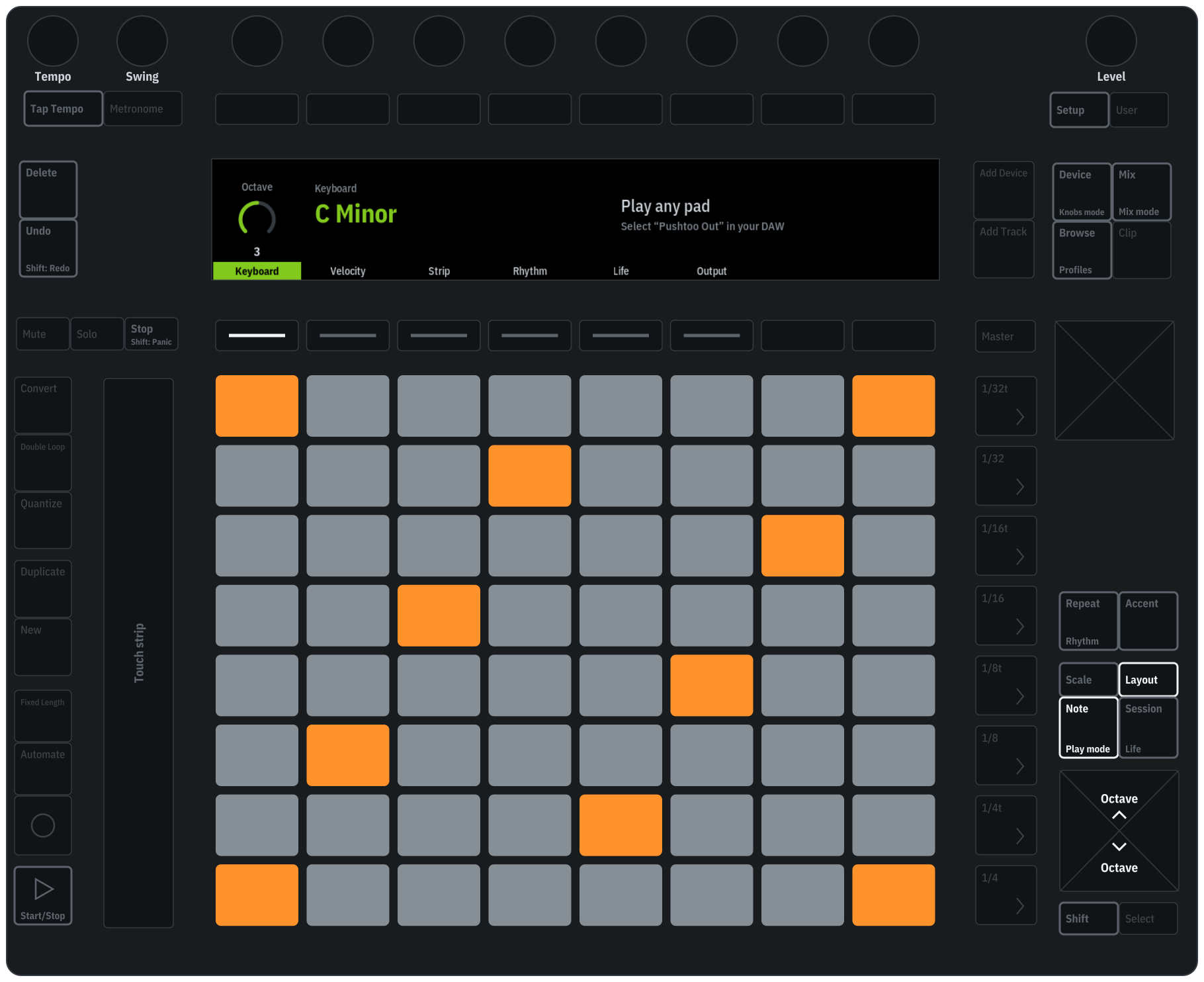
Hold Shift at any time and the screen lists what Shift does in the current mode.

A Push 2 drawn with Pushtoo's labels Each button carries its printed name and, where Pushtoo gives it its own job, what it does underneath. Click to enlarge.

  1. Modes and menus
  2. The display
  3. Playing
  4. Rhythm and tempo
  5. Life and standby
  6. Utility

Modes and menus

Control What it does
Note, Device Play and Knobs modes
Mix Mix mode: faders, mute and solo. Mix again, or ‹, goes back
Browse Profile list: encoder 1 picks, the top-left button loads. Browse again, or the ‹ button at the bottom right, goes back
Setup Pad feel, aftertouch, brightness and clock. Setup again, or ‹, goes back
Layout Tap to cycle Keyboard (channel 1), Drums (channel 10) and the chord grid (channels 2 and 3); it switches when you let go. Hold it and press the button above a layout’s name to go straight there
Scale Open or close the scale menu: top buttons pick In key/Chromatic and C G D A E B F#, bottom buttons pick F Bb Eb Ab Db Gb, encoder 1 picks the scale, encoder 2 the root, encoder 3 the chord grid’s set

The display

Control What it does
Buttons below the display Pages. The first is each layout’s main page; the rest are its settings, ending with Output (destination port and channel)
Buttons above the display Options on the current page
Encoders above the display The current page’s controls. Touch one and it grows a little on screen
Shift + encoder Fine adjust (4x finer)

Playing

Control What it does
Octave up / down Keyboard and chords: shift an octave. Drums: move the pads 32 notes (two banks). A button goes dark when it can’t go further
Accent Every note at full velocity (in the chord grid and on Velocity pages: the page’s Max)
Touch strip Pitch bend or mod wheel, set on the Strip page; in the chord grid it can strum
Sustain pedal (foot-switch jack) Sustain (CC 64) to the pads’ output and channel; polarity on Setup › Pedal
Side buttons (Chord layout) Pick the voicing; the bottom one is Latch

Rhythm and tempo

Control What it does
Repeat Rhythm on or off: held pads repeat in time, or arpeggiate. Hold it for rhythm only while held
Side buttons (with rhythm on) The rate, as printed on them: 1/32t to 1/4. In the Chord layout, hold Repeat to pick one
Play Start and stop: sends MIDI Start and Stop; the button flashes on each beat
Tap Tempo Set the tempo from your last four taps
Tempo and Swing encoders (left) Tempo (Shift for 0.1 BPM steps) and swing. Touch one to see it at the screen’s left edge

Life and standby

Control What it does
Session Life on or off. Hold it for Life only while held
Shift + Session Standby now: the pads and screen animate until you play

Utility

Control What it does
Shift + Stop Panic: all notes off on every output
Undo, Shift + Undo Undo and redo in your DAW (Ctrl+Z and Ctrl+Shift+Z by default; see Undo)
Master encoder (right) Master level CC, in every mode
Hold Delete In Knobs mode: touch a knob to reset it to its default (the screen says so while Delete is held)
Shift + button above a knob In Knobs mode: send that knob’s CC for MIDI learn
Hold Shift Lists what Shift does in the current mode